
728x90
반응형
1. 기본값
<!DOCTYPE html>
<html lang="en">
<head>
  <meta charset="UTF-8">
  <title>HTML5 Canvas</title>
</head>
<body>
<canvas id="draw" width="800" height="800"></canvas>
<script>
</script>

<style>
  html, body {
    margin: 0;
  }
</style>

</body>
</html>
2. 결과
<!DOCTYPE html>
<html lang="en">
<head>
  <meta charset="UTF-8">
  <title>HTML5 Canvas</title>
</head>
<body>
<canvas id="draw" width="800" height="800"></canvas>
<script>
const canvas = document.querySelector('#draw');
const ctx = canvas.getContext('2d');
canvas.width = window.innerWidth;
canvas.height = window.innerHeight;
ctx.strokeStyle = '#BADA55';
ctx.lineJoin = 'round';
ctx.lineCap = 'round';
ctx.lineWidth = 100;
// ctx.globalCompositeOperation = 'multiply';

let isDrawing = false;
let lastX = 0;
let lastY = 0;
let hue = 0;
let direction = true;

function draw(e) {
  if (!isDrawing) return; // stop the fn from running when they are not moused down
  console.log(e);
  ctx.strokeStyle = `hsl(${hue}, 100%, 50%)`;
  ctx.beginPath();
  // start from
  ctx.moveTo(lastX, lastY);
  // go to
  ctx.lineTo(e.offsetX, e.offsetY);
  ctx.stroke();
  [lastX, lastY] = [e.offsetX, e.offsetY];

  hue++;
  if (hue >= 360) {
    hue = 0;
  }
  if (ctx.lineWidth >= 100 || ctx.lineWidth <= 1) {
    direction = !direction;
  }

  if(direction) {
    ctx.lineWidth++;
  } else {
    ctx.lineWidth--;
  }

}

canvas.addEventListener('mousedown', (e) => {
  isDrawing = true;
  [lastX, lastY] = [e.offsetX, e.offsetY];
});


canvas.addEventListener('mousemove', draw);
canvas.addEventListener('mouseup', () => isDrawing = false);
canvas.addEventListener('mouseout', () => isDrawing = false);

</script>

<style>
  html, body {
    margin: 0;
  }
</style>

</body>
</html>
3. 리뷰
라인의 끝과 꺾이는 부분을 round로 설정하여 원을 그리는것처럼 하였다.
arc를 이어그리면 빠르게 드래그했을경우 빈경우가 생기지만 line으로 그리면 빈공간이 생기지 않는다.
hsl의 속성을 이용해서 색깔을 조절한다.
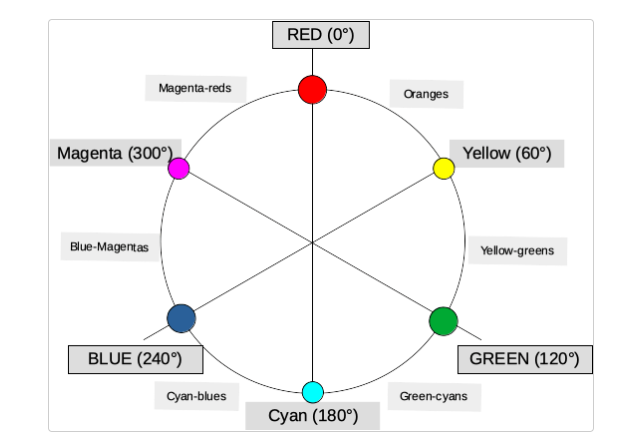
위와 같이 각도로 색깔을 조절할수 있다.
direction을 통해서 선굵기가 일정값을 넘어가면 가늘어지고 다시 굵어지게 설정하였다.
728x90
반응형
'개발 > html, css, js' 카테고리의 다른 글
| [30일 챌린지 Day-12] hidden key (2) | 2022.08.09 |
|---|---|
| [30일 챌린지 Day-10] shift 클릭 (0) | 2022.08.09 |
| [JS] 쿠키와 세션 (0) | 2022.08.09 |
| [JS] 쿠키와 세션 (0) | 2022.08.08 |
| [30일 챌린지 Day-7] some,every,find,findIndex (0) | 2022.07.26 |