728x90
반응형
1. 코드
// express, socket.io , fs , nodemon
const socketio = require("socket.io");
const express = require("express");
const app = express();
const fs = require("fs");
const PORT = 4000;
const server = app.listen(PORT, () => {
console.log("server start");
});
const io = socketio(server);
let daehan = [
[1, 1, 0, 1, 1, 0, 0, 0, 0, 1, 1, 0, 1, 1],
[1, 1, 0, 1, 1, 1, 1, 1, 1, 1, 1, 0, 1, 1],
[1, 1, 0, 1, 1, 1, 1, 1, 1, 1, 1, 0, 1, 1],
[1, 1, 0, 0, 0, 0, 0, 0, 1, 1, 1, 0, 1, 1],
[1, 1, 0, 1, 1, 1, 1, 1, 1, 1, 1, 0, 1, 1],
[1, 1, 0, 1, 1, 1, 1, 1, 1, 1, 1, 0, 1, 1],
];
let asiana = [
[1, 1, 0, 1, 1, 0, 0, 0, 0, 1, 1, 0, 1, 1],
[1, 1, 0, 1, 1, 1, 1, 1, 1, 1, 1, 0, 1, 1],
[1, 1, 0, 1, 1, 1, 1, 1, 1, 1, 1, 0, 1, 1],
[1, 1, 0, 1, 1, 1, 1, 1, 1, 1, 1, 0, 1, 1],
[1, 1, 0, 1, 1, 1, 1, 1, 1, 1, 1, 0, 1, 1],
[1, 1, 0, 1, 1, 1, 1, 1, 1, 1, 1, 0, 1, 1],
];
let jeju = [
[1, 0, 0, 0, 0, 0, 0, 0, 0, 0, 1, 0, 1, 1],
[1, 1, 0, 1, 1, 1, 1, 1, 1, 1, 1, 0, 1, 1],
[1, 1, 0, 1, 1, 1, 1, 1, 1, 1, 1, 0, 1, 1],
[1, 1, 0, 1, 1, 1, 1, 1, 1, 1, 1, 0, 1, 1],
[1, 1, 0, 1, 1, 1, 1, 1, 1, 1, 1, 0, 1, 1],
[1, 1, 0, 1, 1, 1, 1, 1, 1, 1, 1, 0, 1, 1],
];
let seats = [];
let timeTable = 3;
// ... 은 얕은복사
for (let i = 0; i < timeTable; i++) {
seats.push(
JSON.parse(JSON.stringify(daehan)),
JSON.parse(JSON.stringify(asiana)),
JSON.parse(JSON.stringify(jeju))
);
}
app.get("/", (req, res) => {
fs.readFile("homework/page2.html", "utf-8", (err, data) => {
res.send(data.toString());
});
});
app.get("/seats", (req, res) => {
res.send(seats);
});
io.sockets.on("connection", (socket) => {
socket.on("reserve", (data) => {
seats[data.Time][data.y][data.x] = 2;
socket.emit("reserve", data);
});
});<!DOCTYPE html>
<html lang="en">
<head>
<meta charset="UTF-8" />
<meta http-equiv="X-UA-Compatible" content="IE=edge" />
<meta name="viewport" content="width=device-width, initial-scale=1.0" />
<title>Document</title>
<style>
* {
padding: 0;
margin: 0;
}
body {
width: 100%;
height: 100vh;
}
.line {
overflow: hidden;
}
.seat {
margin: 2px;
float: left;
width: 30px;
height: 30px;
border-radius: 3px;
}
.enable {
background-color: gray;
}
.enable:hover {
background-color: rgb(195, 190, 190);
cursor: pointer;
}
.disable {
background-color: blue;
}
.startReserve {
position: absolute;
top: 50%;
left: 50%;
transform: translate(-50%, -50%);
width: 300px;
height: 300px;
font-size: 50px;
font-weight: bold;
background-color: beige;
}
.Wrap {
position: absolute;
top: 25%;
left: 50%;
transform: translate(-50%, -50%);
display: flex;
}
.forTimeSelectDiv {
display: none;
margin-right: 50px;
height: 100px;
width: 400px;
}
.forBrandSelectDiv {
display: none;
width: 400px;
}
.forTimeSelectDiv button,
.forBrandSelectDiv button {
width: 100px;
height: 50px;
border-radius: 5px;
font-weight: bold;
}
.time {
display: none;
position: absolute;
top: 50%;
left: 50%;
transform: translate(-50%, -50%);
}
.showProperty {
position: absolute;
top: 30%;
left: 50%;
transform: translate(-50%, -50%);
display: none;
}
.showCurrent {
font-size: 30px;
font-weight: bold;
}
.colorEnable,
.colordisable {
width: 10px;
height: 10px;
}
.colorEnable {
background-color: gray;
}
.colordisable {
background-color: blue;
}
.showColor {
display: flex;
margin-left: 100px;
justify-content: center;
align-items: center;
font-size: 15px;
}
button {
cursor: pointer;
}
</style>
<script src="https://code.jquery.com/jquery-3.5.1.js"></script>
<script src="/socket.io/socket.io.js"></script>
</head>
<body>
<button class="startReserve">예매하기</button>
<div class="Wrap">
<div class="forTimeSelectDiv">
시간
<button class="timeSelect">13 : 00</button>
<button class="timeSelect">15 : 00</button>
<button class="timeSelect">17 : 00</button>
</div>
<div class="forBrandSelectDiv">
항공사
<button class="brandSelect">대한항공</button>
<button class="brandSelect">아시아나</button>
<button class="brandSelect">제주항공</button>
</div>
</div>
<div class="showProperty">
<div class="showCurrent"></div>
<div class="showColor">
<div class="colorEnable"></div>
예약가능
<div class="colordisable"></div>
예약불가
</div>
</div>
</body>
<script>
const socket = io();
socket.on("reserve", (data) => {
let $target = $(
"div[data-Time =" +
data.Time +
"][data-x = " +
data.x +
"][data-y = " +
data.y +
"]"
);
$target.removeClass("enable");
$target.addClass("disable");
});
$(window).ready(function () {
const onClickSeat = function () {
if ($(this).hasClass("disable")) {
return;
}
let Time = $(this).attr("data-Time");
let x = $(this).attr("data-x");
let y = $(this).attr("data-y");
if (confirm("예매 하겠습니까?")) {
socket.emit("reserve", {
Time,
x,
y,
});
} else {
alert("취소 되었습니다.");
}
};
$.getJSON("/seats", { dummy: new Date().getTime() }, (data) => {
$.each(data, (indexTime, time) => {
let $time = $("<div></div>").addClass("time");
$.each(time, (indexY, line) => {
let $line = $("<div></div>").addClass("line").appendTo($time);
$.each(line, (indexX, seat) => {
let $seat = $("<div></div>", {
class: "seat",
"data-Time": indexTime,
"data-x": indexX,
"data-y": indexY,
}).appendTo($line);
if (seat == 1) {
$seat.addClass("enable").on("click", onClickSeat);
} else if (seat == 2) {
$seat.addClass("disable");
}
});
});
$time.appendTo("body");
});
});
//시간, 항공사 클릭 관련 쿼리셀렉터
let timeSelect = document.querySelectorAll(".timeSelect");
let brandSelect = document.querySelectorAll(".brandSelect");
//시간 클릭시 항공사 클릭버튼 나타나기
$(".startReserve").on("click", () => {
$(".forTimeSelectDiv").css("display", "block");
$(".startReserve").css("display", "none");
$(".timeSelect").on("click", () => {
$(".forBrandSelectDiv").css("display", "block");
$(".brandSelect").on("click", () => {
$(".showProperty").css("display", "flex");
});
});
});
//버튼 클릭시
for (let i = 0; i < timeSelect.length; i++) {
timeSelect[i].onclick = function (e) {
for (let k = 0; k < brandSelect.length; k++) {
brandSelect[k].onclick = function (v) {
$(".showCurrent").text(
e.target.innerText + " " + v.target.innerText
);
let time = document.querySelectorAll(".time");
for (let j = 0; j < time.length; j++) {
time[j].style.display = "none";
}
time[3 * i + k].style.display = "block";
};
}
};
}
});
</script>
</html>2. 결과
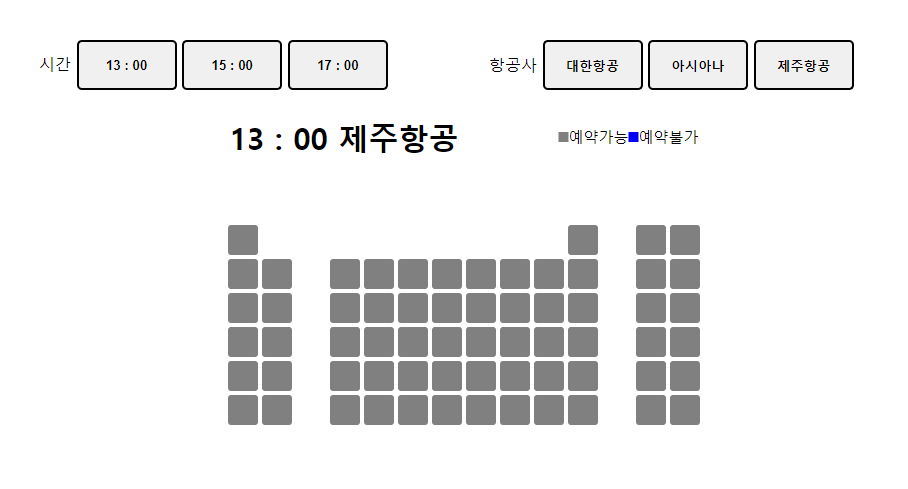
AJAX를 사용하여 데이터를 받아오기 위해 JQUERY를 사용함
시간, 항공사별로 다른 데이터를 불러왔다.
이 데이터들을 불러오려고 깊은복사를 이용해서 데이터 배열을 만들었다.
728x90
반응형
'개발 > node.js' 카테고리의 다른 글
| [Node.js] 로그인시 JWT생성 (0) | 2022.08.09 |
|---|---|
| [Node.js] 채팅, 귓속말 기능 만들기 (0) | 2022.07.29 |
| [Node.js] socket.io 로 채팅방 만들기 (0) | 2022.07.26 |
| [Node.js] 삭제, 수정버튼 만들기 (0) | 2022.07.26 |
| [node.js] express, MySQL (0) | 2022.07.25 |