Spring Cloud Gateway로 구현하는 MSA 아키텍처
모든 코드는 Github에 있습니다.
Spring Cloud Gateway는 마이크로서비스 아키텍처에서 API Gateway 역할을 수행하는 프로젝트입니다. 이 문서에서는 Spring Cloud Gateway의 주요 기능과 설정 방법에 대해 설명합니다.
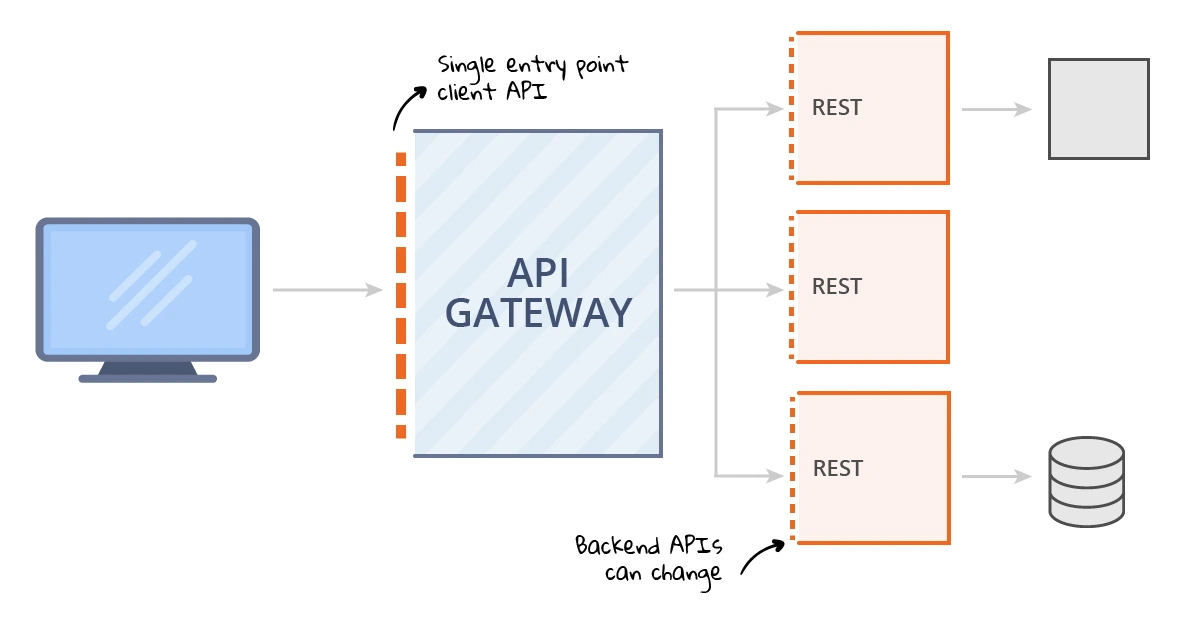
주요 기능
- 역방향 프록시: 클라이언트 요청을 적절한 마이크로서비스로 라우팅합니다.
- 필터: 요청 및 응답을 수정할 수 있는 다양한 필터를 제공합니다.
- 로드 밸런싱: 여러 인스턴스 간에 트래픽을 분산시킵니다.
- 보안: 인증 및 권한 부여를 지원합니다.
- 모니터링: 요청 및 응답에 대한 모니터링 기능을 제공합니다.
목차
- 프로젝트 개요
- 시스템 아키텍처
- 서비스별 구현 설명
- 실행 및 테스트 방법
- 결론
1. 프로젝트 개요
이번 프로젝트에서는 Spring Cloud Gateway를 활용하여 마이크로서비스 아키텍처(MSA)를 구현해보겠습니다. 총 4개의 서비스로 구성되며, 각 서비스는 다음과 같은 역할을 담당합니다:
- Eureka Server: 서비스 디스커버리
- Gateway Service: API 게이트웨이
- Test1 Service: 비즈니스 로직 서비스 1
- Test2 Service: 비즈니스 로직 서비스 2
2. 시스템 아키텍처
아키텍처 구성 요소
Gateway Service: 클라이언트의 요청을 수신하고, 적절한 서비스(Test1 Service 또는 Test2 Service)로 요청을 라우팅하는 역할을 합니다. 이 서비스는 API 게이트웨이로서, 클라이언트와 백엔드 서비스 간의 중개 역할을 수행합니다.
Test1 Service: 특정 기능을 제공하는 서비스로, 게이트웨이 서비스로부터 요청을 받아 처리합니다.
Test2 Service: Test1 Service와 유사하게, 또 다른 기능을 제공하는 서비스입니다. 이 서비스 또한 게이트웨이 서비스로부터 요청을 받아 처리합니다.
Eureka Server: 서비스 등록 및 발견을 위한 서버입니다. 모든 서비스는 Eureka 서버에 등록되어, 게이트웨이 서비스가 요청을 적절한 서비스로 라우팅할 수 있도록 지원합니다. 이를 통해 시스템의 확장성과 유연성을 높일 수 있습니다.
각 서비스는 다음과 같은 포트를 사용합니다:
- Eureka Server: 8761
- Gateway Service: 8000
- Test1 Service: 8081
- Test2 Service: 8082
3. 서비스별 구현 설명
3.1 Eureka Server
먼저 Eureka Server 구현을 위한 build.gradle 설정입니다:
plugins {
    id 'java'
    id 'org.springframework.boot' version '3.4.1'
    id 'io.spring.dependency-management' version '1.1.7'
}

group = 'com.example'
version = '0.0.1-SNAPSHOT'

java {
    toolchain {
        languageVersion = JavaLanguageVersion.of(21)
    }
}

configurations {
    compileOnly {
        extendsFrom annotationProcessor
    }
}

repositories {
    mavenCentral()
}

ext {
    set('springCloudVersion', "2024.0.0")
}

dependencies {
    implementation 'org.springframework.cloud:spring-cloud-starter-netflix-eureka-server'
    compileOnly 'org.projectlombok:lombok'
    annotationProcessor 'org.projectlombok:lombok'
    testImplementation 'org.springframework.boot:spring-boot-starter-test'
    testRuntimeOnly 'org.junit.platform:junit-platform-launcher'
}

dependencyManagement {
    imports {
        mavenBom "org.springframework.cloud:spring-cloud-dependencies:${springCloudVersion}"
    }
}

tasks.named('test') {
    useJUnitPlatform()
}
Eureka Server 메인 애플리케이션 클래스:
@SpringBootApplication
@EnableEurekaServer
public class EurekaServerApplication {
    public static void main(String[] args) {
        SpringApplication.run(EurekaServerApplication.class, args);
    }
}
@EnableEurekaServer 한줄만 추가하면 됩니다.
application.yml 설정:
server:
  port: 8761

spring:
  application:
    name: eureka-server

eureka:
  client:
    register-with-eureka: false # Eureka 서버가 자신을 Eureka 서버에 등록하지 않도록 설정
    fetch-registry: false # Eureka 서버가 다른 Eureka 서버의 인스턴스 정보를 가져오지 않도록 설정
  server:
    # Eureka 서버의 인스턴스 정보를 보관하는 시간을 설정
    wait-time-in-ms-when-sync-empty: 0
3.2 Gateway Service
Gateway Service의 build.gradle 설정:
plugins {
    id 'java'
    id 'org.springframework.boot' version '3.4.1'
    id 'io.spring.dependency-management' version '1.1.7'
}

group = 'com.example'
version = '0.0.1-SNAPSHOT'

java {
    toolchain {
        languageVersion = JavaLanguageVersion.of(21)
    }
}

configurations {
    compileOnly {
        extendsFrom annotationProcessor
    }
}

repositories {
    mavenCentral()
}

ext {
    set('springCloudVersion', "2024.0.0")
}

dependencies {
    implementation 'org.springframework.cloud:spring-cloud-starter-gateway'
    implementation 'org.springframework.cloud:spring-cloud-starter-netflix-eureka-client'

    // mac에서 netty native 사용
    runtimeOnly 'io.netty:netty-resolver-dns-native-macos:4.1.104.Final:osx-aarch_64'
    compileOnly 'org.projectlombok:lombok'
    annotationProcessor 'org.projectlombok:lombok'
    testImplementation 'org.springframework.boot:spring-boot-starter-test'
    testRuntimeOnly 'org.junit.platform:junit-platform-launcher'
}

dependencyManagement {
    imports {
        mavenBom "org.springframework.cloud:spring-cloud-dependencies:${springCloudVersion}"
    }
}

tasks.named('test') {
    useJUnitPlatform()
}
Gateway Service 메인 클래스:
@SpringBootApplication
@EnableDiscoveryClient
public class GatewayServiceApplication {
    public static void main(String[] args) {
        SpringApplication.run(GatewayServiceApplication.class, args);
    }
}
Gateway Service application.yml:
server:
  port: 8000

spring:
  application:
    name: gateway-service

  cloud:
    gateway:
      routes:
        - id: test1-service
          uri: lb://test1-service
          predicates:
            - Path=/api/*/test1/**
        - id: test2-service
          uri: lb://test2-service
          predicates:
            - Path=/api/*/test2/**

eureka:
  client:
    service-url:
      defaultZone: http://localhost:8761/eureka/
  instance:
    instance-id: ${spring.cloud.client.ip-address}:${spring.application.instance_id:${random.value}}
    prefer-ip-address: true
3.3 Test1 Service & Test2 Service
두 서비스의 build.gradle 설정은 동일합니다:
plugins {
    id 'java'
    id 'org.springframework.boot' version '3.4.1'
    id 'io.spring.dependency-management' version '1.1.7'
}

group = 'com.example'
version = '0.0.1-SNAPSHOT'

java {
    toolchain {
        languageVersion = JavaLanguageVersion.of(21)
    }
}

configurations {
    compileOnly {
        extendsFrom annotationProcessor
    }
}

repositories {
    mavenCentral()
}

ext {
    set('springCloudVersion', "2024.0.0")
}

dependencies {
    implementation 'org.springframework.boot:spring-boot-starter-web'
    implementation 'org.springframework.cloud:spring-cloud-starter-netflix-eureka-client'
    compileOnly 'org.projectlombok:lombok'
    annotationProcessor 'org.projectlombok:lombok'
    testImplementation 'org.springframework.boot:spring-boot-starter-test'
    testRuntimeOnly 'org.junit.platform:junit-platform-launcher'
}

dependencyManagement {
    imports {
        mavenBom "org.springframework.cloud:spring-cloud-dependencies:${springCloudVersion}"
    }
}

tasks.named('test') {
    useJUnitPlatform()
}
Test Service 메인 클래스:
@SpringBootApplication
@EnableDiscoveryClient
public class Test1Application {
    public static void main(String[] args) {
        SpringApplication.run(Test1Application.class, args);
    }
}
Test Service yml:
server:
  port: 8081

spring:
  application:
    name: test1-service # 이 이름으로 유레카에 서비스 등록 후 로드밸런싱

eureka:
  client:
    service-url:
      defaultZone: http://localhost:8761/eureka/
  instance:
    instance-id: ${spring.cloud.client.ip-address}:${spring.application.instance_id:${random.value}}
    prefer-ip-address: true
Test Controller (1,2 두서버다 설정)
@RestController
@RequestMapping("api/v1/test1")
@RequiredArgsConstructor
public class Test1Controller {

    @GetMapping("/hello")
    public String hello() {
        return "Hello from Test1 Service";
    }
}
4. 실행 및 테스트 방법
서비스 실행 순서:
- Eureka Server 실행
- Gateway Service 실행
- Test1 Service 실행
- Test2 Service 실행
테스트를 위해 다음 엔드포인트에 접근해볼 수 있습니다:
- Eureka Dashboard: http://localhost:8761
서버 실행 후 eureka 대시보드에 들어가게 되면 서비스가 등록된것을 확인 할 수 있다.
Test1 Service: http://localhost:8000/api/v1/test1/hello
Test2 Service: http://localhost:8000/api/v1/test2/hello
위 두개로 들어가면 테스트 서버에서 설정해논것처럼 컨트롤러에 요청이 잘 들어가는걸 확인할 수 있다.
5. Gateway Filter 설정
Gateway 서버에서 필터를 설정할 수 있는데 크게 2가지 방법이 있다.
gateway 서버는 netty를 이용하여 비동기로 작동하므로 OncePerRequestFilter를 사용할 수 없었다.
GlobalFilter : 모든 라우트에 적용되는 전역 필터로, 로깅이나 인증과 같은 공통 기능을 구현할 때 사용됩니다.
GatewayFilter : 정 라우트에만 선택적으로 적용되어, 해당 라우트에 특화된 기능을 구현할 때 사용됩니다.
spring security 사용시 WebFilter로 만들어서 원하는 위치에 필터를 설정할수 있었다.
(1) CustomGlobalFilter
@Component
@Slf4j
public class CustomGlobalFilter implements GlobalFilter, Ordered {

    @Override
    public Mono<Void> filter(ServerWebExchange exchange, GatewayFilterChain chain) {
        log.info("Custom Global Filter executed");

        // 요청 정보 로깅
        ServerHttpRequest request = exchange.getRequest();
        log.info("Request URI: {}", request.getURI());
        log.info("Request Method: {}", request.getMethod());

        // 응답 정보 로깅을 위한 후처리
        return chain.filter(exchange)
                .then(Mono.fromRunnable(() -> {
                    ServerHttpResponse response = exchange.getResponse();
                    log.info("Response Status Code: {}", response.getStatusCode());
                }));
    }

    @Override
    public int getOrder() {
        return -1; // 필터 체인에서 가장 먼저 실행되도록 설정
    }
}
서버 재시작 후 test 경로를 다시 들어가면 아래와 같은 로깅이 된다.
2025-01-08T14:09:46.292+09:00  INFO 98304 --- [gateway-service] [ctor-http-nio-4] c.e.gateway.filter.CustomGlobalFilter    : Custom Global Filter executed
2025-01-08T14:09:46.293+09:00  INFO 98304 --- [gateway-service] [ctor-http-nio-4] c.e.gateway.filter.CustomGlobalFilter    : Request URI: http://localhost:8000/api/v1/test2/hello
2025-01-08T14:09:46.293+09:00  INFO 98304 --- [gateway-service] [ctor-http-nio-4] c.e.gateway.filter.CustomGlobalFilter    : Request Method: GET
2025-01-08T14:09:46.312+09:00  INFO 98304 --- [gateway-service] [ctor-http-nio-4] c.e.gateway.filter.CustomGlobalFilter    : Response Status Code: 200 OK
(2) GatewayFilter
@Component
public class CustomAuthFilter extends AbstractGatewayFilterFactory<Config> {

    public CustomAuthFilter() {
        super(Config.class);
    }

    @Data
    public static class Config {
        private String headerName;
        private String headerValue;
    }

    @Override
    public GatewayFilter apply(Config config) {
        return (exchange, chain) -> {
            ServerHttpRequest request = exchange.getRequest();

            // 인증 헤더 검사 로직
            if (!request.getHeaders().containsKey(config.getHeaderName())) {
                return handleUnauthorized(exchange);
            }

            List<String> headerValues = request.getHeaders().get(config.getHeaderName());
            if (headerValues == null || !headerValues.contains(config.getHeaderValue())) {
                return handleUnauthorized(exchange);
            }

            return chain.filter(exchange);
        };
    }

    private Mono<Void> handleUnauthorized(ServerWebExchange exchange) {
        ServerHttpResponse response = exchange.getResponse();
        response.setStatusCode(HttpStatus.UNAUTHORIZED);
        return response.setComplete();
    }
}
추가로 yml에 filter 설정을 해주면 된다. test1에만 적용하면 아래와 같다.
- id: test1-service
  uri: lb://test1-service
  predicates:
    - Path=/api/*/test1/**
  filters:
    - name: CustomAuthFilter
      args:
        headerName: X-API-KEY
        headerValue: your-api-key-value
args 에는 Config의 필드를 주입할 수 있다.
다시 실행해보면 test1은 필터가 작동해서 안들어가지고 test2에는 정상적으로 들어가진다.
6. 결론
Spring Cloud Gateway를 구축하기 위해선 보통 eureka 서버와 함께 사용한다.
정말 간단하게 구축해봤지만 msa의 맛을 조금 느껴볼수 있었다.
더 나아가서 openFeign을 이용하면 내부 서비스끼리 서비스 이름으로도 호출할 수 있다는 장점이 있다.
근데 Gateway 서버가 비동기 서버라서 multipart/formdata 형식을 잘 처리하지 못하는거 같았다.
내가 아직 못찾은건지 모르겠지만 gateway github issue상으로는 그래보였다.
무튼 코드 몇줄로 msa를 찍먹해볼수 있어서 재밌었다.
참고
What is an API Gateway? | How it Can Actually Deliver Practical Results
'개발 > Spring Boot' 카테고리의 다른 글
| [Spring] Spring Cloud Config 퀵 스타트 (0) | 2025.01.03 |
|---|---|
| [SpringBoot] Propagation.REQUIRES_NEW에서 겪은 이슈 (1) | 2024.09.11 |
| [Spring Boot] JsonDeserialize 활용해서 요청 Body 커스텀하기 (0) | 2024.09.03 |
| [Spring Boot] Spring Boot WebClient (0) | 2023.08.04 |
| [Spring Boot] Spring Security - OAuth2 (Google login) (0) | 2023.07.20 |